Deploy it to Roomi, from Claude or the CLI
Put the demo online in a private room. Say “deploy it to roomi” to Claude with the connector, or use the CLI. Nothing goes live until you say yes.
On this page
By Kaz Kato · Published 12 October 2026 · Updated 12 October 2026
Add the Roomi connector to Claude and say “deploy it to roomi”. Claude checks the demo, rehearses the deploy, shows you what would go live and publishes only when you say yes. A demo too big for a chat, or one with its own server, goes out with the roomi CLI instead, with the same rehearsal first.
This chapter covers both routes, step by step, and why a room is the last step rather than a link to the artifact itself. The full reference is in the docs: deploying from Claude and the CLI.
Why not just share the artifact?
Because from Claude’s apps, your client probably cannot open it. An artifact shared from a Claude chat asks everyone who opens it to sign in with a Claude account, so a prospect without one has to make one first. A room opens in any browser, with nothing to sign up for, and tells you who looked.
Anyone opening an artifact shared from Claude’s apps, rather than published by Claude Code, needs a Claude account and must be signed in. The one exception is an older artifact published from a chat, which opens without one. Claude Code can publish an artifact to a public link that anyone can open, with no claude.ai sign-in. On Team and Enterprise plans, public sharing is off until an owner turns it on. Claude Code’s artifacts page describes no record of who opened an artifact, no expiry date and no guided tour. For anyone outside your organisation, it describes a public link, not one for a named person.
That is why Roomi is the last step. The demo you built in Claude goes on a link in your client’s name, which can expire or be revoked, with a guided tour. You see who opened it, how long they stayed, which screens held them and who they passed it to.
| What you get | Screenshots in a deck | A screen recording | A shared Claude artifact | A hosting link | A Roomi room |
|---|---|---|---|---|---|
| Your client clicks the real thing | No | No | Yes | Yes | Yes |
| Opens with no account to make | Yes | Partly: Depends on the tool | Partly: From a Claude Code public link; not from Claude’s apps | Yes: Unless you protect it | Yes |
| A guided tour of what matters | Yes: The slides tell it | Yes: You narrate it | Not on its own pages | No | Yes: Over the live demo |
| A link of their own for each person | No | Partly: Depends on the tool | No: One address for everyone | No: One address for everyone | Yes: On Pro and above |
| You see who looked, and what they did | No | Partly: Views, in some tools | Not on its own pages | Partly: Page views, not by person | Yes: Visits, tour steps and minutes, by person |
| They reply on the screen they mean | No | Partly: Comments, in some tools | Partly: Comments for people you add, not by public link | No | Yes: Comments pinned to the demo, with a screenshot |
From Anthropic’s own pages: Anyone opening an artifact shared from Claude’s apps, rather than published by Claude Code, needs a Claude account and must be signed in. The one exception is an older artifact published from a chat, which opens without one. Claude Code can publish an artifact to a public link that anyone can open, with no claude.ai sign-in. On Team and Enterprise plans, public sharing is off until an owner turns it on. The other ways are compared by how they work, not tool by tool.
The two routes
| The connector | The CLI | |
|---|---|---|
| Where | A chat on claude.ai or in the Claude app | A terminal, or Claude Code, in the demo’s folder |
| Deploys | A static demo held in the conversation: at most 200 files and 3 MB | Any demo on disk: a static build of up to 5,000 files, or a container demo |
| You install | Nothing | Node 24 and the CLI |
| Signs in | In your browser | In your browser, once |
| Links, activity and feedback | Yes, from the chat | Yes, from the terminal |
Add the connector
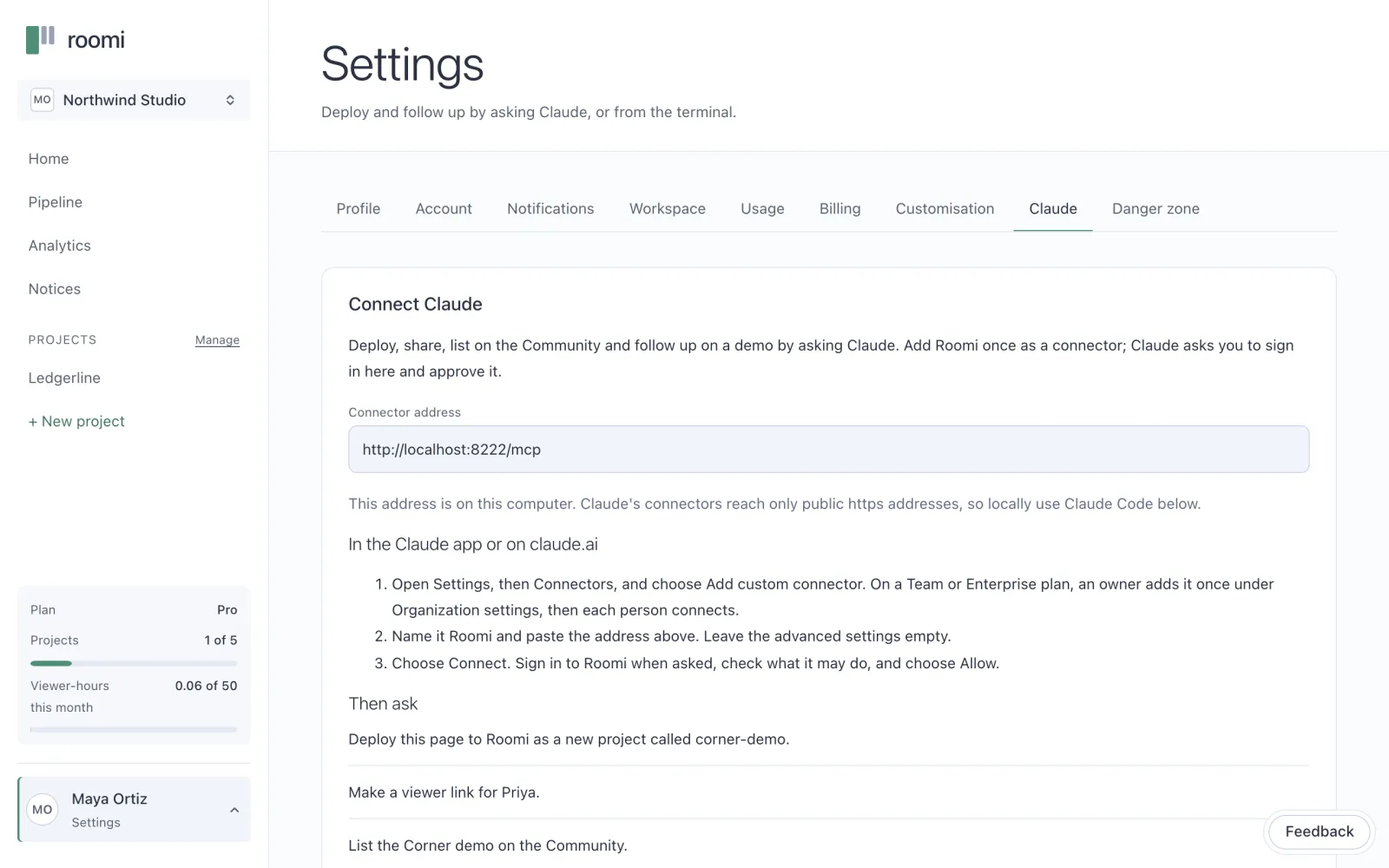
In Claude, open Settings, then Connectors, and choose Add custom connector.
Name it Roomi, and paste the address:
https://mcp.getroomi.com/mcpChoose Connect. Claude sends you to Roomi: sign in, check what it may do, and choose Allow.
The address is also in the app, under Settings, Connect Claude.
Say “deploy it to roomi”
In the chat where Claude built the demo, say it. Claude does the rest, and asks you before anything goes live:
- It reads the guide. The connector teaches Claude what a demo must be before it prepares anything.
- It writes the files and the tour. It shows you the tour and keeps it on your yes.
- It checks the demo. Every problem at once, each with its fix. Claude fixes them and checks again.
- It rehearses. Nothing is sent. Claude shows you what would go live and asks whether to publish.
- It publishes, on your yes. The room is live.
- It offers the next step. On a paid plan, a link for the first person you want to show it to.
Here is the rehearsal the connector returns for a small demo, as the docs show it. Claude reads it to you before it asks:
Rehearsal only: nothing has been sent to the platform.
Project: corner-demo (new; it will be created)
Files: 2, 36 bytes (130 bytes packed)
  index.html  18 bytes
  till/index.html  18 bytes
Apps: shop at / (phone)
Story: 1 step: till at /till/
Pages: why-corner.md as "Why Corner"
Manifest: {"kind":"static","output":".","name":"Corner","apps":[…],"story":[…],"pages":["why-corner.md"]}
Publishing makes this the live build of the room. Call again with commit: true only after the person says yes.
Or use the CLI
The CLI is for a demo in a folder: one with a build step, one too big for a chat, or one with a server. Claude Code can run these commands for you in the demo’s folder. Install the CLI and sign in once:
npm install -g @getroomi/cli
roomi login
Then, in the demo’s folder:
roomi init             # describes the demo in pitch.json
roomi validate         # checks pitch.json; builds and sends nothing
roomi deploy           # the rehearsal: builds, scans, checks the tour
roomi deploy --commit  # publishes exactly what it checked
Without --commit, nothing leaves your machine. The rehearsal builds the demo and scans it for secrets. It checks that every page the tour opens is in the build, and shows what would go live. --commit runs the same checks again and publishes exactly that.
To show a change to your team before your viewers see it, send it as a preview: roomi deploy --commit --preview. Viewers keep the live build until roomi promote --commit makes the preview live.
If a new build is wrong, roomi rollback --commit makes the one before it live again, at once. Every link keeps working. The app’s Builds tab does the same with Roll back to this.
What does it cost?
You can deploy on Free, which holds 5 projects and static demos. A room on Free is a draft only you can open, or listed on the community at one public address. A private link for each person comes with Pro, at £4 a month before VAT, with container demos and full analytics.
Pricing has every plan, and the next chapter makes the tour each viewer is walked through.
Before you move on
- Add the connector to Claude, or install the CLI and sign in
- Say “deploy it to roomi”, or run the rehearsal
- Read what would go live before you say yes
- Open the room as a viewer once it is live
Questions people ask
Does Claude publish without asking me?
No. Claude rehearses first and shows you exactly what would go live. It publishes only when you say yes to that rehearsal. If the demo changes afterwards, it rehearses again and asks again.
What if my demo has its own server?
Then it is a container demo, deployed from your machine with the CLI. It builds the demo, runs it, rehearses every step of the tour on that running copy, and only then publishes. Container demos are on Pro and above.
Sources
Anthropic: support.claude.com/en/articles/9547008-publishing-and-sharing-artifacts, checked 12 October 2026
Anthropic: code.claude.com/docs/en/artifacts, checked 12 October 2026
About the author
Kaz Kato, Co-founder & CTO, Roomi. Kaz co-founded Roomi with Tesh, whom he has built with since 2017: two startups that failed, one venture studio that didn’t, and an exit.