The five checks before anyone sees it
Five checks to run on a Claude-built demo before a client opens it: nothing real, every screen, the device, the tour, and a look as a viewer.
On this page
By Kaz Kato · Published 12 October 2026 · Updated 12 October 2026
Before anyone sees it, check five things. It holds nothing real. Every screen the tour opens works. It reads well on the device your client will use. It has a short guided tour. And you have opened it yourself, as a viewer would. Each takes minutes, and Roomi does much of the checking for you.
A client forgives a plain screen. They do not forgive a broken one. These checks are also the checklist at the back of the PDF, so you can tick them off as you go. The deploy docs list every check the connector makes, and the CLI docs say what the rehearsal runs.
| Check | What catches it | What you do |
|---|---|---|
| Nothing real in it | The deploy’s own checks for keys and hidden files | Ask Claude to sweep it for real names and addresses |
| Every screen works | The rehearsal, which opens every page the tour visits | Click every link once yourself |
| The right device | The frame you choose for each app | Look at it in that frame, and on a phone |
| A guided tour | A note from the rehearsal when there is none | Write three to six steps |
| Seen as a viewer | Nothing: this one is yours | Open it as a viewer before you send it |
1. Nothing real in it
A demo runs on invented data, so the first check is that nothing real crept in. When Claude deploys from a chat, the connector refuses any file that looks like it holds a live credential. That means a private key, or a key for AWS, Stripe, GitHub, Slack, Anthropic, OpenAI or Google. It refuses hidden files such as .env too, and anything in node_modules. The CLI scans the project and the build with gitleaks before anything leaves your machine.
Keys are only half of it. Ask Claude to look for the rest:
Search the whole demo for anything that looks like a real email address,
phone number, street address or company. Replace each with something
clearly invented, and list what you changed.
2. Every screen works
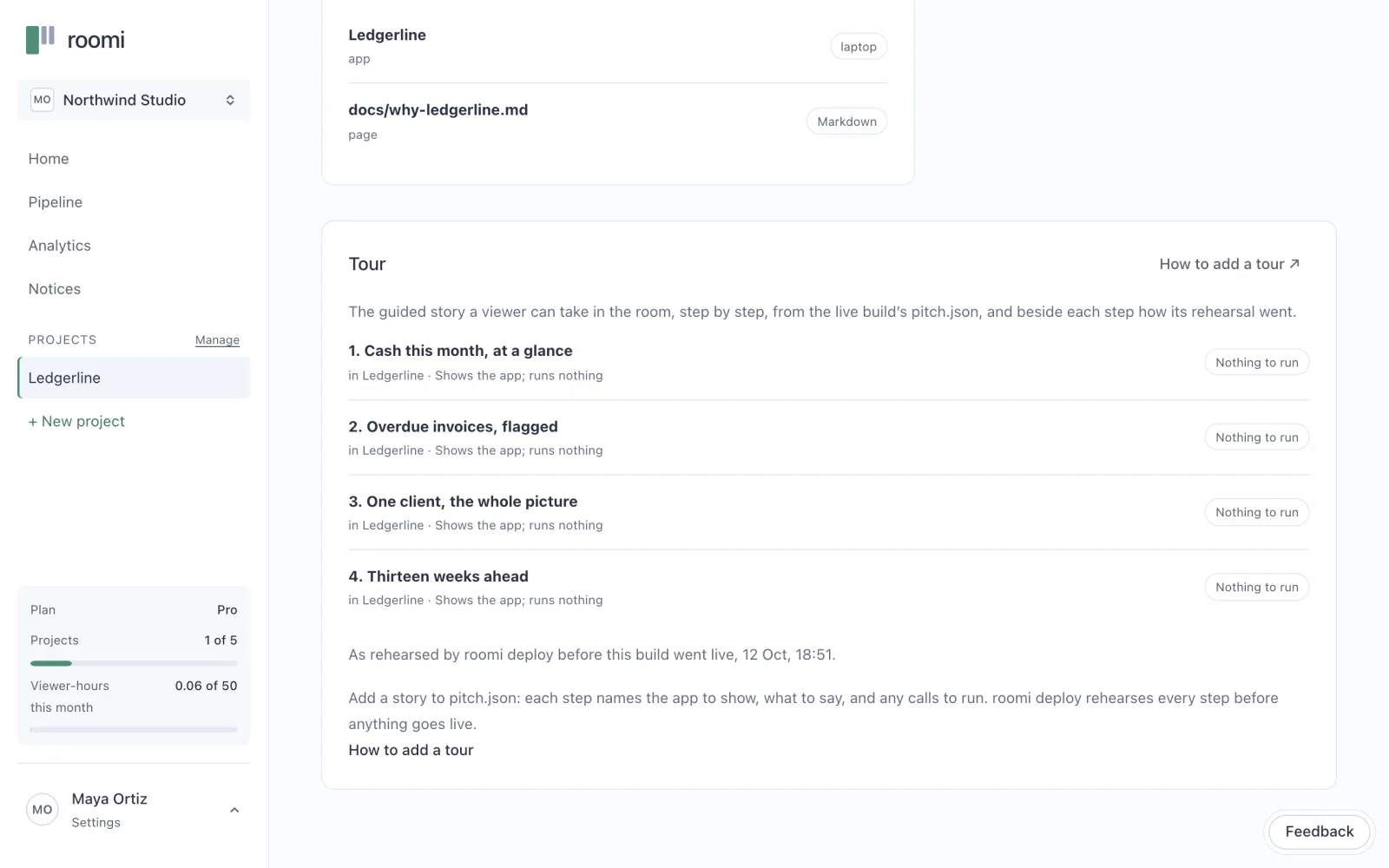
Every step of the tour opens a page, and the deploy checks that each one is there. From a chat, a step whose page is not among the files stops the deploy, with the fix. From the CLI, roomi deploy checks that every page the story opens is in what it built. While you work, roomi dev shows the real room on your own machine, and counts each page that does not answer.
Then click through it yourself, once, as your client would. Every button, every link, every way back.
Check it works with nothing outside it. A live app demo runs on Node 24 with no internet, so anything that fetches from elsewhere as it runs fails in the room. That includes a call to an AI model: give it canned answers first (chapter two shows how).
3. The right device
Each app in the demo has a frame the room draws it in: phone, tablet, laptop, screen or none. Choose the one your client will use. A step of the tour can show the same page in another frame, so the last step of a laptop demo can show it on a phone. In the room, On your phone shows a code that opens the demo on the viewer’s own phone, as the same person.
4. A guided tour
A tour is what turns a demo into a pitch: a few steps, each saying what to notice and opening the screen that shows it. A demo without one still deploys, and the deploy says it has none. Chapter five is about writing it.
5. Seen as a viewer
Open the room exactly as your client will before you send anything. Preview as viewer, at the top of every project in the app, opens it in a new tab, marked as a preview. From the terminal, roomi open does the same. A preview records nothing, so you can take the tour and click everything without a visit appearing in your analytics.
When all five pass, it is ready to go live.
Before you move on
- Nothing real in it: no customer data, no keys, no real names
- Every screen the tour opens works, and every link goes somewhere
- It needs nothing from the internet: no live AI model, no remote data
- It reads well on the device your client will use
- It has a guided tour of three to six steps
- You have opened it yourself, as a viewer would
Questions people ask
What happens if a check fails?
Nothing is sent. The connector’s check and the CLI’s rehearsal name every problem they find at once, each with its fix. Claude fixes them and checks again before it asks whether to publish.
Do I need all five every time?
Yes, and they are quick. The rehearsal before every deploy does most of the checking for you. The two that are yours alone are the device and the look as a viewer, and each takes a couple of minutes.
About the author
Kaz Kato, Co-founder & CTO, Roomi. Kaz co-founded Roomi with Tesh, whom he has built with since 2017: two startups that failed, one venture studio that didn’t, and an exit.